MQTT Client
Characteristics
MQTT is an OASIS standard messaging protocol for the Internet of Things (IoT). To learn more about the standard, visit the MQTT website.
Information Model Requirements
- The first node after the root node must be of type Events or Variables with a Simple Data Type or Custom Data Type.
- Properties can be used for dynamic topics within Events and Complex Variables.
-
The following Node Types can be used under the Event Node:
-
Variables with a Simple Data Type represent the key-value pairs.
- Variables with a Custom Data Type represent objects that can contain key-value pairs.
- With Lists, you can aggregate multiple variables.
Hint
When publishing a topic, the Information Model dictates the payload's structure.
Hint
When subscribing to a topic, ensure that the Information Model structure aligns with the payload.
Complex Variables Nodes
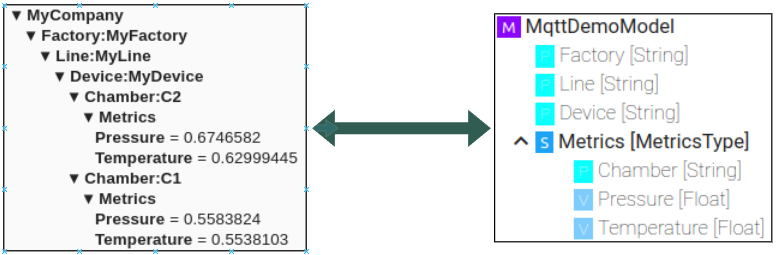
Event Nodes
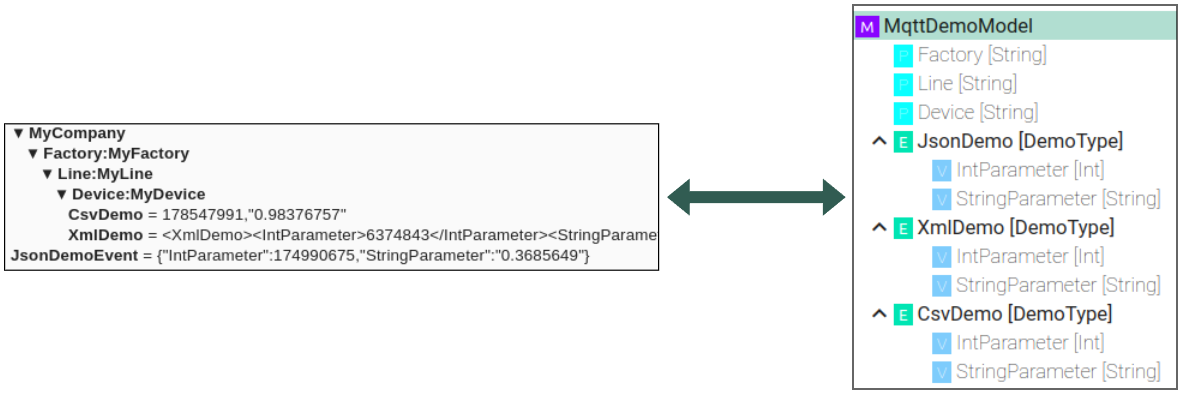
Configuration
Model
- Select the MQTT Client as Channel Type.
- Click the Configure button.

- Select the root model node.
-
Configure the MQTT client:
-
Enter Host and Port of the MQTT Broker used.
- (Optional) Specify a Client ID.
- Set the Quality of Service (QoS).
- If required, configure the credentials.
-
If required, configure TLS:
- (Optional) Provide CA certificate to validate the host.
- (Optional) Provide Client certificate and key file for client authentication.
- (Optional) Provide a prefix for the topic that will be used when publishing messages.
- If required, adjust the default values for Reconnect interval and the Unit.
- (Optional) Change the default message options. These can be overwritten for each event.

Events
-
Select the event node in the tree on the left.
-
Select the Direction (Producer or Consumer).
- For Producer, set Retain if required.
- Configure the topic.
- Optional: Override the default message options.

Variables
-
Select the variable node in the tree on the left.
-
Select the Direction (Producer or Consumer).
- For Producer, set Retain if required.
- Configure the topic.
- Optional: Override the default message options.

Topics
The topics for publishing and subscribing can be configured in a static but also dynamic way, where variables and properties are used within the topic.
Producer
- In the Model configuration, a prefix (
Producer topic prefix) can be configured. - This prefix will be automatically added to the topics for producer events and variables.
- If variables/properties are going to be used, they need to be written in the
${VariableName}pattern. - In the producer prefix, only variables that are directly in the root node of the Model can be used.
- In the topic configuration of the events/complex variables, only variable and properties with the complex variable can be used.
- If the topic in the event/complex variable configuration starts with a
/, then the prefix will not be added.
Example
Following variable values are used in the example:
| Name | Value |
|---|---|
| Factory | MyFactory |
| Line | MyLine |
| Device | MyDevice |
| Chamber | 15 |
Topic Configuration
| Producer Prefix | Event / Complex Variable Topic | Topic (Example) |
|---|---|---|
MyCompanyNamespace |
Complex variable: Metrics |
MyCompanyNamespace/Metrics |
Factory:${Factory}/Line:${Line}/Device:${Device} |
Complex variable: Chamber:${Chamber}/Metrics |
Factory:MyFactory/Line:MyLine/Device:MyDevice/Chamber:15/Metrics |
Factory:${Factory}/Line:${Line}/Device:${Device} |
Complex variable: /Chamber:${Chamber}/Metrics |
/Chamber:15/Metrics |
Consumer
- In the Model configuration, a prefix (
Consumer topic prefix) can be configured. - This prefix will be automatically added to the topics for consumer events and variables.
- Variables/properties can be used as wildcards in events and complex variables. They need to be written in the
${VariableName}pattern. - Wildcards are not supported in the prefix.
- Wildcards variables/properties can only be used for an entire topic segment. For example,
MyNamespace/${Factory}/Metricswill be translated intoMyNamespace/+/Metrics. - A partial topic segment is not possible. For example,
MyNamespace/Factory:${Factory}/Metrics. - If the topic in the event/complex variable configuration starts with a
/, then the prefix will not be added.
Example
| Consumer Prefix | Event / Complex Variable Topic | Topic (Example) |
|---|---|---|
MyCompanyNamespace |
Complex variable: Metrics |
MyCompanyNamespace/Metrics |
MyCompanyNamespace |
Complex variable: ${Factory}/${Line}/${Device}/${Chamber}/Metrics |
MyCompanyNamespaceFactory/+/+/+/+/Metrics |